




To change Server Credentials, perform the following steps.
- At the Confirm selection pane, select a virtual machine.
The Change Server Credentials button is enabled. - Click the Change Server Credentials button.
The credentials pop-up is displayed.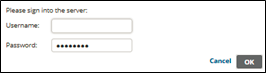
- Make your changes, and then click OK. .
Note 1: The backup set relies on these credentials to perform the backup. Use credentials that do not change often, else the backup fails.
Note 2: You can authenticate to the following:
- Unmanaged ESXi host
- vCenter that manages one or more ESXi hosts