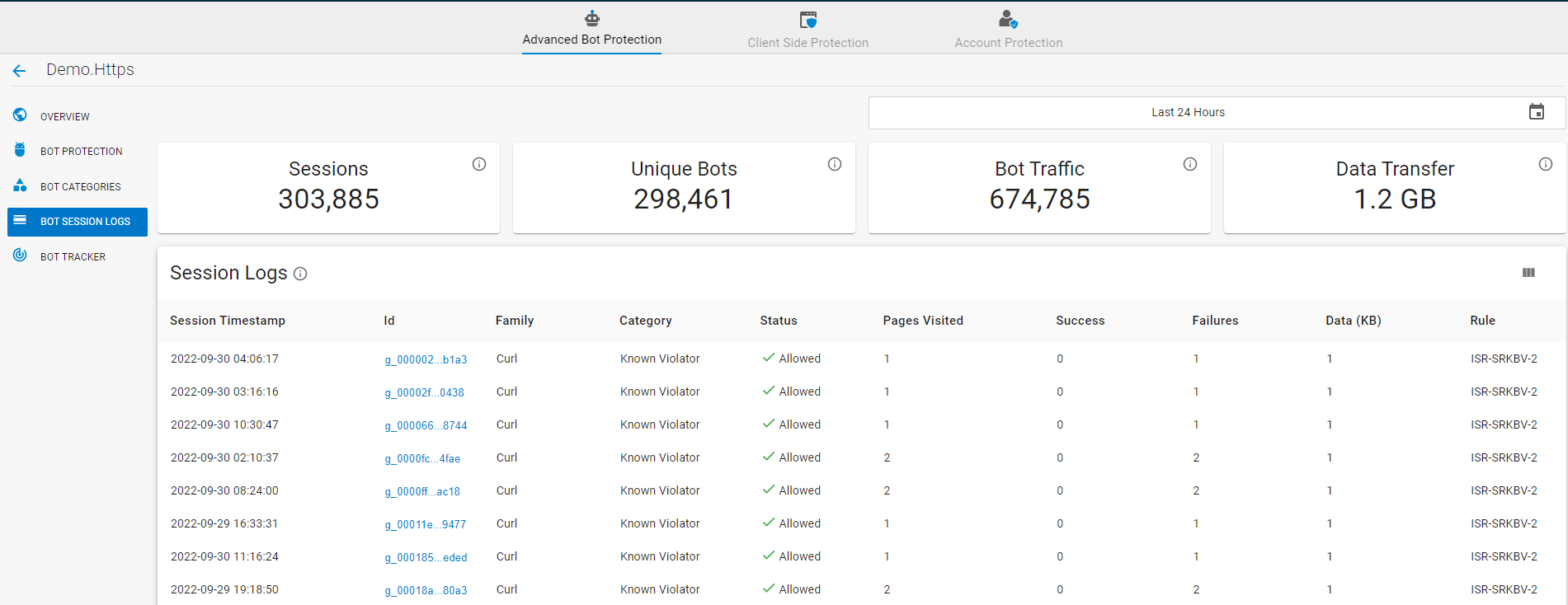
The Bot Session Logs section provides information on the total number of sessions established by bots.
- Sessions – Displays the total number of sessions established by the identified bots.
- Unique Bots – Displays the total number of unique bots that established the session.
- Bot Traffic – Displays the total number of bot requests received by the web application.
- Data Transfer – The amount of data transferred in the session.
- Sessions Logs – Session log details for the identified bots. Details include the following:
- Session Timestamp: The time stamp of the established session.
- ID: A unique ID given to a specific user on which the requests are aggregated to create the session.
- Family: Name of the family the identified bot belongs to. User agent family, i.e., users coming from Chrome / Edge / Google / Bing etc., using multiple user agents but are all part of that specific bot family.
- Category: Name of the predefined category the bot belongs to. Users are categorized according to their behavior such as crawler, scraping, etc. See the Bot Categories article.
- Status: Indicates the status of the current user as follows: "Blocked: Blocked by WAF", "Challenged: Challenged for CAPTCHA by WAF", "Allowed: Allowed by WAF".
- Pages Visited: Displays the number of pages the bot attempted to visit in the session.
- Success: Number of requests in the session that were successful and received a success status response code from the server.
- Failures: Number of requests in the session that failed to receive the success status response code from the server.
- Data (KB): Displays the data (in KB) transferred in the session.
Rule: Displays the rule that got triggered during the session.
Rule Definition ISR-SRKBV-1 Empty User agent! ISR-SRKBV-2 Known Bad User agent! ISR-SRKBV-3 Global Bad IP Address! ISR-SRKBV-4 Filtered Crawler! ISR-SRKBV-4 Automated Browser (JavaScript Check) ISR-SRKBV-5 Request originating from the 'Known Bad Device' used for performing the 'Bad Activities'. ISR-SRKBV-6 Bot masking the user agent to that of a crawler and making the bot request! ISR-SRKBV-7 Exact reason cannot be derived because it is based on the score that is calculated for the stream, and it also considers previous scores as well. ISR-SRKBV-8 Using the randomly generated user agent to avoid detection! ISR-SRKBV-9 Request made by bots whose behavior or purpose of crawling is not known! ISR-SRKBV-10 User agent format invalid and does not have valid device class attached with it! BRR-SRKBV-11 JavaScript challenge failed! BRR-SRKBV-12 JavaScript challenge failed and IP/FP tripped on some attack detection module in data path. BRR-SRKBV-13 Injection Attack detected by WAF. BRR-SRKBV-14 XSS Injection Attack detected by WAF. BRR-SRKBV-15 SQL Attacks detected by WAF. BRR-SRKBV-16 File Attacks detected by WAF. BRR-SRKBV-17 AUTH Attacks detected by WAF.