




For our network discovery scan, we use a ping sweep to scan the network. We will scan multiple IP Addresses at once to see what devices are in the scan range. In some environments, this will be seen as a threat by network security or it could cause problems with network hardware.
To disable Ping Sweep you will need to edit C:\Program Files (x86)\Level Platforms\Onsite Manager\Bin\MWExpertSystem.exe.config using a text editor. Please make a backup of this file prior to proceeding.
- Do the following:
- Search for <ThreadPoolConfiguration>
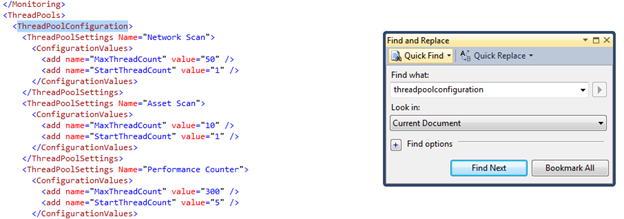
Add the following below it:
<ThreadPoolSettings Name="icmp legacy scanner">
<ConfigurationValues>
<add name="MaxThreadCount" value="10" />
<add name="StartThreadCount" value="10" />
</ConfigurationValues>
</ThreadPoolSettings>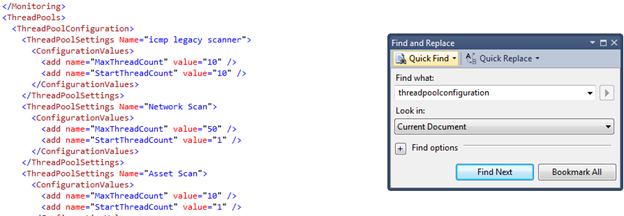
- Search for <ThreadPoolConfiguration>
- Then do the following:
- Search for <appSettings>
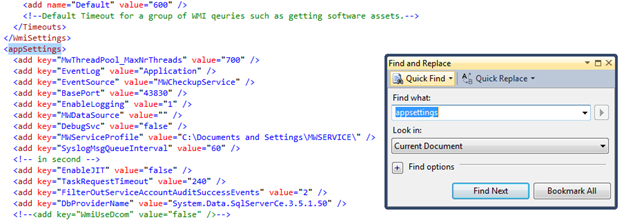
- Add the following below it:
<add key="UseFastIcmpSweep" value="false" />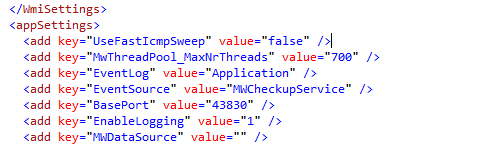
- Search for <appSettings>
- Save the file and close it.
- Restart the MWExpertSystem service