
It seems like your browser didn't download the required fonts. Please revise your security settings and try again.
Barracuda WAF-as-a-Service

You are currently viewing the legacy Barracuda Campus portal

Due to ongoing compatibility requirements during the migration, some users are still being redirected here. All content is being transitioned to the new Campus Training Portal and Campus Documentation Portal, and this legacy portal will be fully retired once the migration is complete.

Please visit https://campus.barracuda.com for more information.

Understanding Traffic Flow with Barracuda WAF-as-a-Service

  • Last updated on

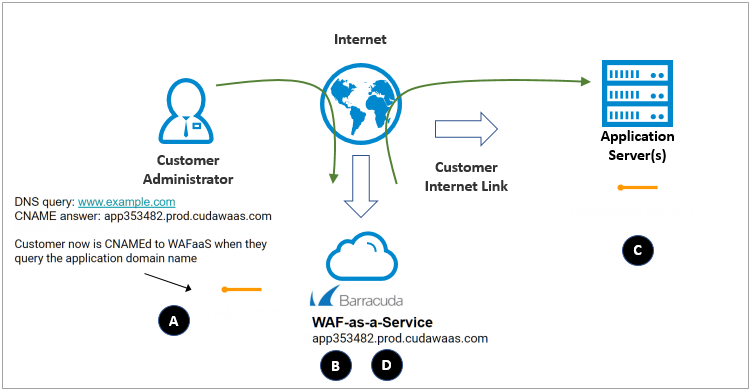
When setting up Barracuda WAF-as-a-Service, it is helpful to understand the flow of traffic between Barracuda WAF-as-a-Service and your application servers.
WAFaaS_network2a.png


The diagram above illustrates the following important points:

A. Barracuda Networks assigns a domain name to each application, as described in Endpoints. During setup, you will change your DNS records to point all of your application traffic to your Barracuda Networks endpoints.

B. Barracuda WAF-as-a-Service proxies your website traffic, protecting your website against attacks including OWASP Top 10, Bots, Account Take Over, and network attacks such as Distributed Denial-of-Service (DDoS).

C. Legitimate traffic is passed via your Internet link to your application servers, which process the request and return a response.

D. Barracuda WAF-as-a-Service proxies your application server’s responses, blocking sensitive information such as credit card and social security numbers, and masking information about your application server that could help attackers determine the operating system or server software you are running.  It then returns the response to your users.


Note

Note that if your application servers are behind a network firewall performing Network Address Translation (NAT), you must configure the network firewall to expose these application servers on a public IP address. For your convenience, you can use multiple ports on the same IP address to expose multiple application servers. Make sure to configure your network firewall to only allow connections to these addresses directly from Barracuda Networks, as described in Restricting Direct Traffic.