
It seems like your browser didn't download the required fonts. Please revise your security settings and try again.
Barracuda Backup

You are currently viewing the legacy Barracuda Campus portal

Due to ongoing compatibility requirements during the migration, some users are still being redirected here. All content is being transitioned to the new Campus Training Portal and Campus Documentation Portal, and this legacy portal will be fully retired once the migration is complete.

Please visit https://campus.barracuda.com for more information.

How to Resolve "EWS connection error" for Specific Users in Message-Level Backup

  • Last updated on

This article applies to Microsoft Exchange 2010 Message-Level backup.

When the NT AUTHORITY/SELF permission is removed from a user, 'EWS connection error' is generated in an Exchange 2010 Message-Level backup:

 EWSConnectionError.png

To resolve this error:

  1. Log in to the Exchange server, and open the Exchange Management Console (EMC).
  2. Expand Recipient Configuration, and click Mailbox.
  3. Navigate to and right-click the user, and click Manage Full access Permission.
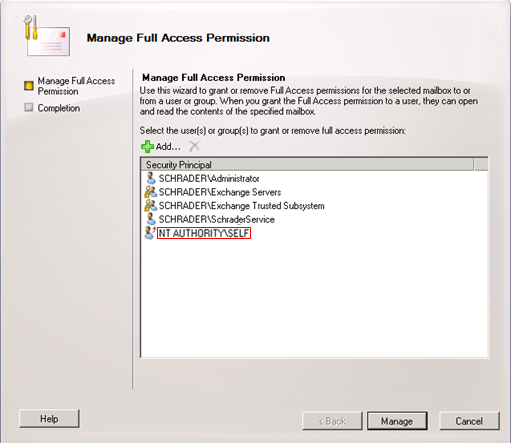
  4. Verify that the NT AUTHORITY/SELF permission is missing from the list, and then click Add.
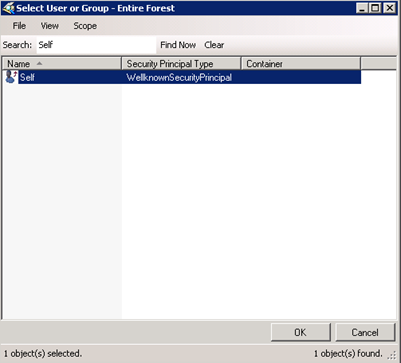
  5. Type self in the search field, and click Find Now:
    SelfPermission.png
  6. Click OK. The permission is added to the list:
    ManagePermissions.png 
  7. Click Manage, and then click Finish to update the user permissions.