




URL Filter objects have been used up to CloudGen Firewall version 8.3 based on a database with version WCS 2.0. As of firmware version 9.0, a new set of URL Filter categories is now used under version WCS 3.2.
Due to the change of the underlying WCS system (database of URL Filters) in the CloudGen Firewall, some categories have been completely removed, and other categories now refer to new names, have different IDs for the same category name, or share the same ID for a different category.
Although these URL Filter matching objects are applied in firmware version <=8.3 in Application Rules, the URL Filter objects are used in firmware 9.0 as part of the new policy profiles.
This change affects some aspects of how to handle these new URL Filter categories when migrating them from firmware release <=8.3 to firmware >=9.0.
Migrating URL Filter Categories for a Stand-Alone Firewall and HA Pairs from Firmware <=8.3 to Firmware 9.0
When migrating a stand-alone firewall from firmware <=8.3 to 9.0, all URL category objects will be updated from WCS 2.0 to WCS 3.2.
After migrating a stand-alone firewall from firmware <=8.3 to firmware 9.0, it is recommended to verify that the categorization of the category objects refers correctly to your individual requirements. If a certain category does not relate correctly, you must reconfigure its usage in its special context.
As an example, the URL Filter object list on the box level (and cluster level in a Control Center) will display the following table:
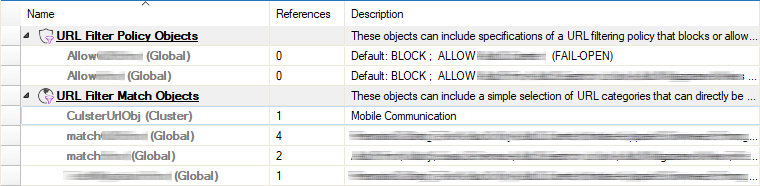
Migrating URL Filter Categories in a CGF Control Center
Because a CC-managed firewall has the same relation to its parent cluster as a stand-alone firewall to the root node in Firewall Admin, all URL Filter objects in the cluster will be updated from WCS 2.0 to WCS 3.2.
You must therefore perform the following steps:
- Update all firewalls in a cluster.
- Migrate the cluster.
When updating the Control Center to version 9.0, you must consider that the URL Filer objects will be handled differently because some categories have changed completely, and policy objects can also be managed on a global or range level and can be referenced in all clusters:
- The firewall feature level of global and range sets will be updated accordingly, but there will be no WCS migration for the URL Filter objects.
- After the update to version 9.0, all firewalls still reference the former version of WCS 2.0.
As an example, the URL Filter object list on the global/range level in a Control Center will display the following table:
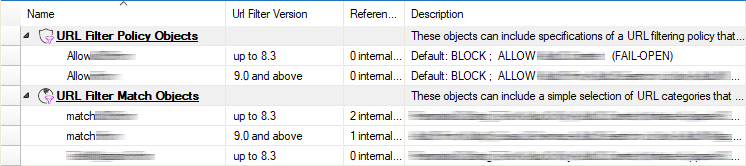
Note that not all policies use URL categories (e.g., Applications, IPS, File Content,...), and as a result, WCS issues do not affect those policies. The other policies derive their WCS version from the contained URL Filter objects, which may also be "not available" ("N.A.") if no URL Filter match is used in a specific policy. The following table shows the meaning of the different entries in the user interface table "URL Filtering Shared Policy Profiles":
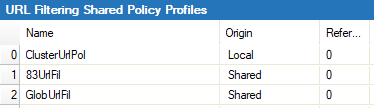
The meaning of the entries in the column "URL Filter Version" is as follows:
| URL Filter Version | Meaning |
|---|---|
| “N.A.” | No URL Filter object is used in this policy |
| “up to 8.3” | No WCS3.2 object and at least one WCS2.0 object is used |
| “9.0 and above” | At least one WCS3.2 object is used |
Referencing and Creating Explicit URL Filter Objects...
...on Global or Range Sets
When you edit policies, the column "URL Filter Version" can contain the following values:
| URL Filter Version | Result | |
|---|---|---|
| “N.A.” | …referencing a URL Filter object | In case there is an 8.3 reference for this policy (see migration chapter for more details), only WCS2.0 objects are offered. No 8.3 ref: Objects for both versions are offered. |
| “N.A.” | …creating an explicit URL Filter object | In case there is an 8.3 reference for this policy (see migration chapter for more details), Explicit Object is set to WCS2.0. No 8.3 ref: User gets asked which version to use. |
| “up to 3.2” | …referencing a URL Filter object | Only WCS2.0 objects are offered. |
| “up to 3.2” | …creating an explicit URL Filter object | Objects of both versions are offered. WCS2.0 objects are marked as “8.3 – will be migrated for usage”. |
| “9.0 or higher” | …referencing a URL Filter object | Objects of both versions are offered. WCS2.0 Objects are marked as “8.3 – will be migrated for usage”. |
| “9.0 or higher” | …creating an explicit URL Filter object | Explicit Object is set to WCS3.2. |
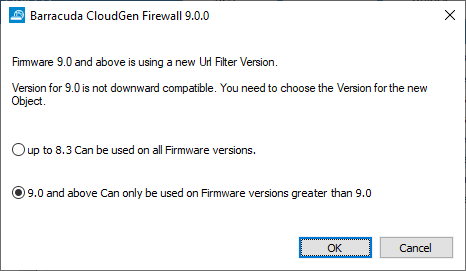
When you create new URL Filter objects, you can select in the following window which WCS version you want to relate the object to:
Manual Migration of Global/Range URL Filter Objects and Policies
URL Filter objects can be migrated up to version 8.3. When you trigger the migration, the version number of the references in all shared policies will be checked. If just a single reference refers to a former URL Filter version 2.0, the policy will not be migrated.
URL Filter objects can be migrated up to version 8.3. When you trigger the migration, all references will be checked according to the following constraints:
- If direct references in rule sets or cluster sets are present and if their current version is <9.0., the migration is not done.
- If references are used in policies of the same object set, the references of these policies are checked. If the references are used in rule sets <9.0, the migration is not done.
- Only for global objects: if references are used in range policies, the references of the range policy are checked.
For migrating an object, perform the following steps:
- Log into your Control Center.
- Depending on where you want to migrate your URL Filter objects and policies:
- On a global level – Go to CONFIGURATION > Configuration Tree > Multi-Range > Global Settings > Firewall Objects/Policies.
- On a range level – Go to CONFIGURATION > Configuration Tree > Multi-Range > Global Settings > your range > Range Settings > Firewall Objects/Policies.
- Select and right-click the related row with a column text "up to 8.3" in the table.
- From the list, select Migrate to URL Filer Version 9.0 and above.
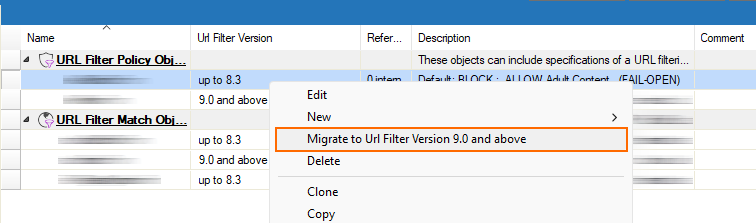
- If all required conditions are met, the migration process will start.
- If the migration is not possible for some reason or if it fails, you will be presented with a dialog window with additional information.