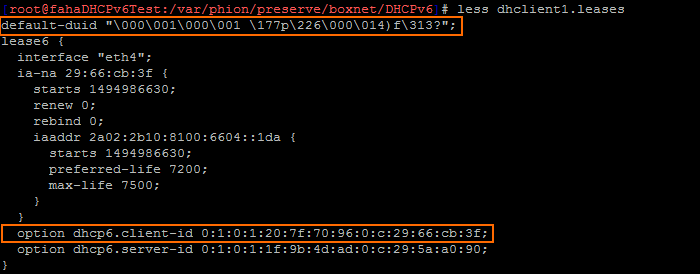
In some cases, your ISP may require the DUID to configure your IPv6 WAN access. The DUID is stored on the firewall in /var/phion/preserve/boxnet/DHCPv6 in the file dhclient<n>.leases, where <n> stands for the number of the DHCP interface. When creating a PAR file, these lease files are not archived. Although these configuration files are recreated by the DHCPv6 client on its first restart after re-installing or restoring the firewall from a backup, the original DUID information must be restored manually into these files.
How to Retrieve the DUID from the Original IPv6 Lease File
Create a backup of your DUID after the first successful DHCPv6 connection to your Internet provider.
- Log into your firewall via SSH.
- Enter
cd /var/phion/preserve/boxnet/DHCPv6 - Locate the configuration file
dhclient<n>.leasesfor the interface, where<n>stands for the number of the DHCP interface. For example:dhclient1.leases.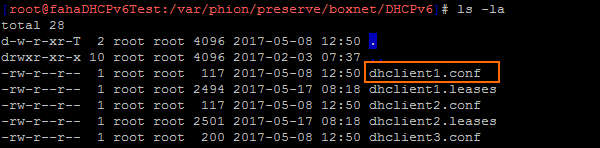
- Enter
less dhclient<n>.leasesto list the content of the DHCPv6 file. Note:<n>stands for the number of the DHCP interface.