
It seems like your browser didn't download the required fonts. Please revise your security settings and try again.
Barracuda CloudGen Firewall

You are currently viewing the legacy Barracuda Campus portal

Due to ongoing compatibility requirements during the migration, some users are still being redirected here. All content is being transitioned to the new Campus Training Portal and Campus Documentation Portal, and this legacy portal will be fully retired once the migration is complete.

Please visit https://campus.barracuda.com for more information.

How to Enable SSH Root Access for Public Cloud Firewalls

  • Last updated on

By default, the root login for SSH is disabled for CloudGen Firewalls in the Public Cloud. SSH access for the root user can be enabled by the admin. By default, key authentication is required for SSH access. Optionally, password authentication can also be enabled.

Enable SSH Root Access

  1. Go to CONFIGURATION > Configuration Tree > Box > Advanced Configuration > SSH.
  2. Click Lock.
  3. In the left menu, select Basic Setup.
  4. From the Permit Root Login drop-down list, select key-only.
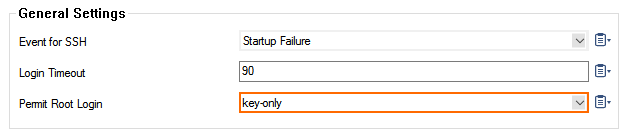
     

    root_ssh_key_01.png

     
  5. Click Send Changes and Activate.