
It seems like your browser didn't download the required fonts. Please revise your security settings and try again.
Barracuda CloudGen Firewall

You are currently viewing the legacy Barracuda Campus portal

Due to ongoing compatibility requirements during the migration, some users are still being redirected here. All content is being transitioned to the new Campus Training Portal and Campus Documentation Portal, and this legacy portal will be fully retired once the migration is complete.

Please visit https://campus.barracuda.com for more information.

How to Switch from Policy Profiles (back) to Application Rules

  • Last updated on

When using policy profiles on your Barracuda CloudGen Firewall, you can revert the configuration in order to use application rules, instead. However, be aware that all of your configured policy profiles will be lost when switching to application rules. When switching back to policy profiles at a later stage, you must reconfigure them to take effect in your application rules. Also, switching from policy profiles to application rules reverts changes made to access rules during the usage of policy profiles.

Generally, it is recommended to create a backup of your configuration before switching from policy rules to application rules in case you want to switch back to policy rules later. On a Control Center, you can also create a copy of your configuration to a repository. For more information, see Backups and Recovery and Repositories.

Switch from Policy Profiles to Application Rules

  1. Go to CONFIGURATION > Configuration Tree > Box > Assigned Services > Firewall > Forwarding Rules.
  2. Right-click Forwarding Rules.
  3. In the list, select Lock.
  4. In the list, select Copy from Default. This will replace all relevant settings with those for the application rules.
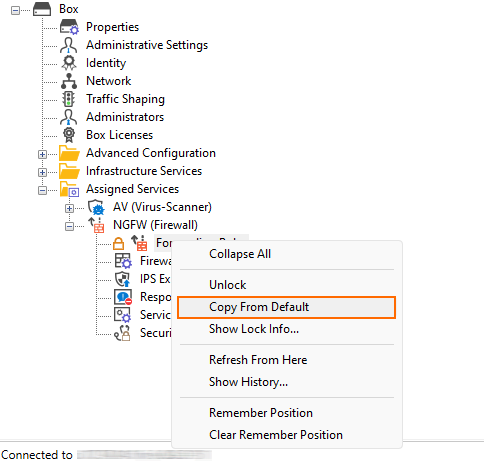
    policy_profiles_copy_from_defaults.png
  5. In the menu list, select Forwarding Application Rule Set.
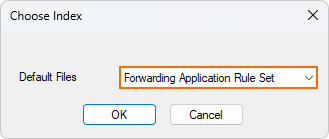
    policy_profiles_switch_from_policy_profiles_to_application_rules.png
  6. Click OK.
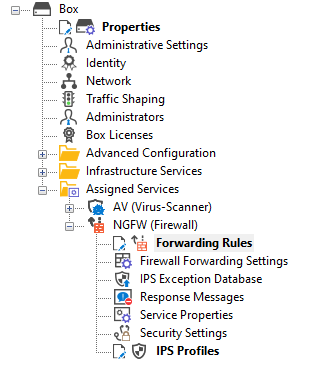
  7. Note the difference between the configuration nodes in the configuration tree:

    Configuration Nodes
    with Policy Profiles
    Configuration Nodes
    with Application Rules
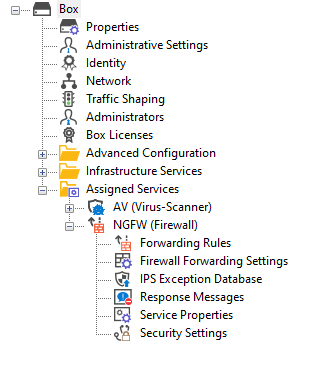
    policy_profiles_conf_tree_for_policy_profiles.png
    policy_profiles_conf_tree_for_app_ruleset.png


  8. Click Send Changes / Activate.

Your firewall settings are now configured to use application rules instead of policy profiles.