
It seems like your browser didn't download the required fonts. Please revise your security settings and try again.
Barracuda Intronis Backup
formerly ECHOplatform

You are currently viewing the legacy Barracuda Campus portal

Due to ongoing compatibility requirements during the migration, some users are still being redirected here. All content is being transitioned to the new Campus Training Portal and Campus Documentation Portal, and this legacy portal will be fully retired once the migration is complete.

Please visit https://campus.barracuda.com for more information.

Setting a SQL Database to Simple Recovery Model

  • Last updated on

To set a SQL database to the Simple Recovery Model, perform the following steps.

Note: Having a database in this recovery model is required in order to take differential backups (instead of full backups).

  1. Open SQL Server Management Studio.
  2. Log into the SQL instance containing the database you want to back up.
  3. Expand the Databases folder to show the database you want.
  4. Right-click the database and select Properties.
  5. In the Properties window, select the Options page on the left.
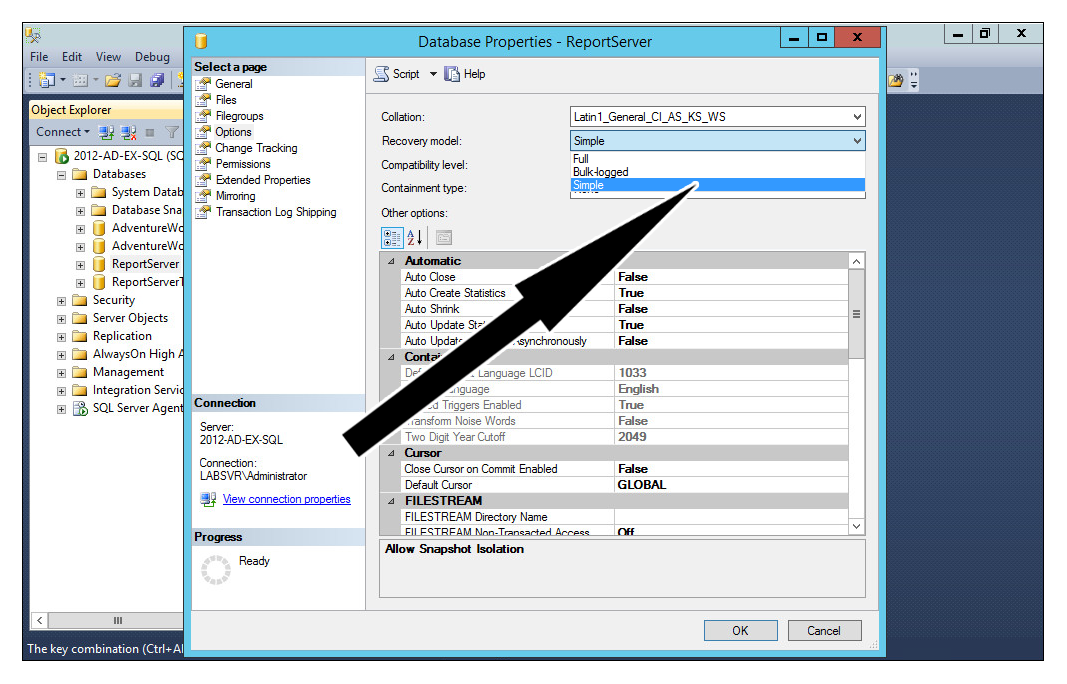
    simplerecoverymodel.png
  6. Change the Recovery model: field to Simple and click OK at the bottom.