
It seems like your browser didn't download the required fonts. Please revise your security settings and try again.
Barracuda Load Balancer

You are currently viewing the legacy Barracuda Campus portal

Due to ongoing compatibility requirements during the migration, some users are still being redirected here. All content is being transitioned to the new Campus Training Portal and Campus Documentation Portal, and this legacy portal will be fully retired once the migration is complete.

Please visit https://campus.barracuda.com for more information.

Understanding HTTP Compression

  • Last updated on

This article applies to Services with type Layer 7 - HTTP.

You can create a compression policy including applicable response content types for a Rule or Service with Layer 7 - HTTP Services on the WEBSITES > HTTP Compression page in the web interface. All configured Services and Rules display in the Compression table.

To edit HTTP compression, go to the WEBSITES > HTTP Compression page, and click the Edit icon following the Service or Rule you wish to modify; the edit page displays:
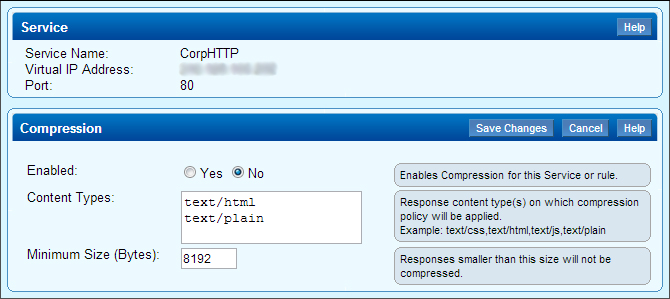
compression.jpg

Modify the compression settings, and then click Save Changes.