
It seems like your browser didn't download the required fonts. Please revise your security settings and try again.
Barracuda RMM
formerly Managed Workplace

You are currently viewing the legacy Barracuda Campus portal

Due to ongoing compatibility requirements during the migration, some users are still being redirected here. All content is being transitioned to the new Campus Training Portal and Campus Documentation Portal, and this legacy portal will be fully retired once the migration is complete.

Please visit https://campus.barracuda.com for more information.

How to Use Remote Control in Microsoft Edge (Chromium)

  • Last updated on

With new installations of Microsoft Edge there is no direct ClickOnce support. This is required for beginning Remote Desktop, PuTTy, and VNC connections within Barracuda RMM.

To install the required plugin, follow these steps:
  1. Open Edge2. In the URL field navigate to https://chrome.google.com/webstore/detail/meta4-clickonce-launcher/jkncabbipkgbconhaajbapbhokpbgkdc.
  2. If prompted to allow extensions from other stores, click Allow extensions from other stores and Allow on the next prompt.
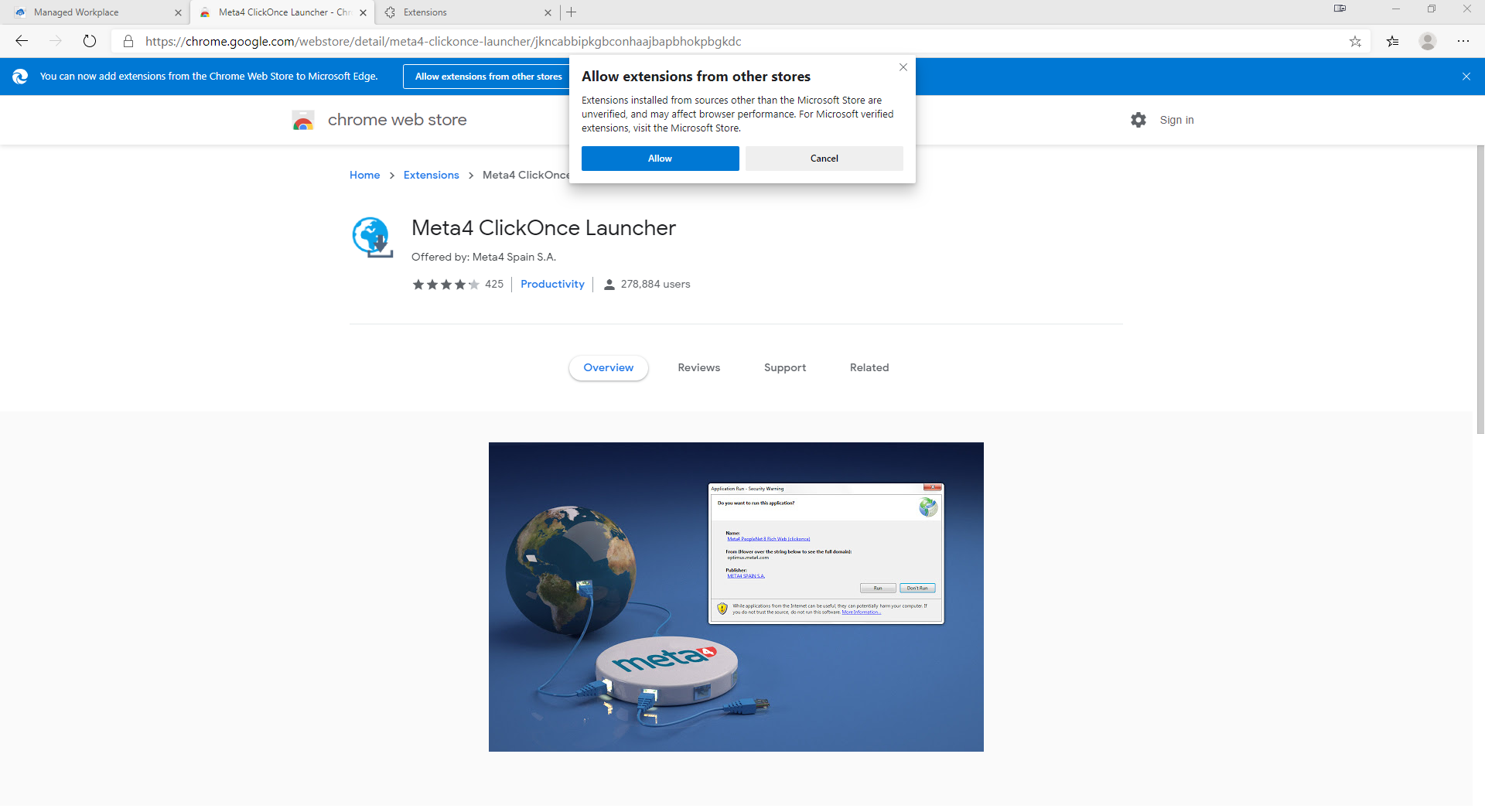
    msedge_G282u65CZS.png
  3. Click Add to Chrome.
  4. Click Add Extension.
  5. Save and run the executable for the Meta4 ClickOnce launcher.