
It seems like your browser didn't download the required fonts. Please revise your security settings and try again.
Barracuda RMM
formerly Managed Workplace

You are currently viewing the legacy Barracuda Campus portal

Due to ongoing compatibility requirements during the migration, some users are still being redirected here. All content is being transitioned to the new Campus Training Portal and Campus Documentation Portal, and this legacy portal will be fully retired once the migration is complete.

Please visit https://campus.barracuda.com for more information.

Office 365 2.0 Service Module SKUs

  • Last updated on

The SKUs page shows which Office 365 SKUs have been purchased. It also displays the number of:

  • Active licenses—Total licenses

  • Warning licenses—Licenses that have expired, but can currently be renewed without penalty

  • Consumed licenses—Licenses that are in use

  • Suspended licenses—Licenses that are suspended. Users are not able to sign in or access services, but administrators can sign in and access data.

For a list of all SKUs, see List of Service Plan SKUs.

To view Office 365 SKUs
  1. In Service Center, click Status > Service Modules.

  2. Do one of the following:

    • Click the Microsoft Office 365 2.0 link.

    • Under Management, on the right side, click Microsoft Office 365 2.0.

  3. Click the link for a site.

  4. In the Account Summary area, click the number next to SKUs Purchased.
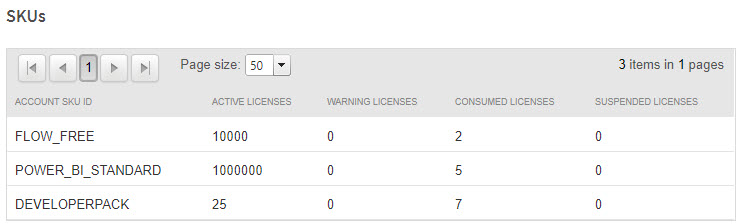
SKUs.jpg