The SecureEdge Manager allows you to configure Agent Breakout for the Web Filter, allowing users to selectively backhaul traffic based on categories, domains, or both.
Key features of SecureEdge Access routing include:
Granular web traffic control: Specify which web traffic is backhauled for inspection.
Exempted traffic: Domains or categories you exempt will:
Remain subject to DNS-based filtering.
Bypass security inspection.
Egress directly from the endpoint.
Default Exemptions: Microsoft M365, streaming services, and conferencing applications are excluded by default.
Policy Scope: Applies only to SecureEdge Access agents using Internet or Premium Access plans.
Configure Agent Breakout
Go to https://se.barracudanetworks.com and log in with your existing Barracuda Cloud Control account.
The chosen Tenant/Workspace is displayed in the top menu bar.
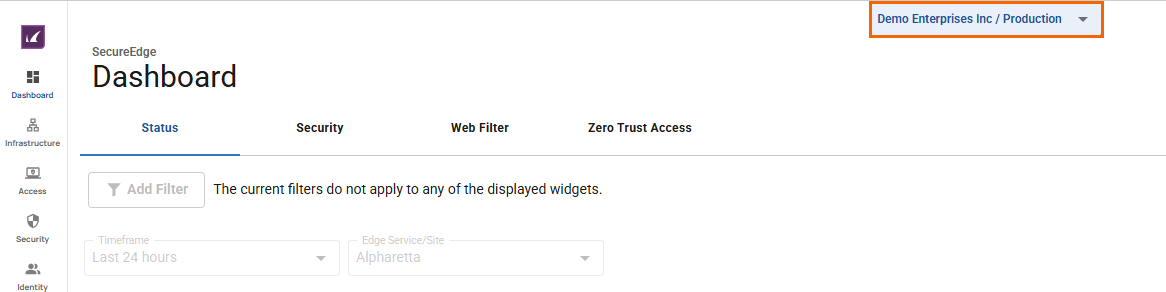
From the drop-down menu, select the workspace you want to configure Agent Breakout for.
Go to Security.
Expand the Web Filter menu on the left and select Agent Breakout.
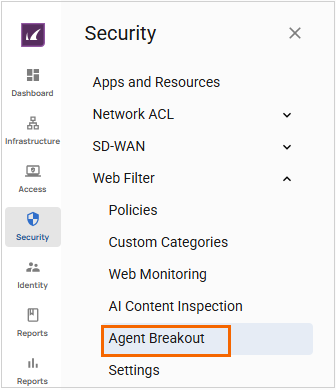
The Agent Breakout page opens.
Select one of the following options: Smart Agent Breakout (default) or Full Backhaul. Specify values for the following:
Adult material
Adult Magazine or News, Adult Porn, Adult Search Or Links, Fetish, Nudity, Sexual Expression(Text), Sexual Services.
Adult recreation
Alcoholic Products, Drinking, Fireworks, Gambling in General, Lottery, Paintball, Smoking.
Business
Agriculture, Architecture, Automotive, Business & Commercial, Home & Family, Law, Life Events, Miscellaneous Business, Mobile Operators, Photography & Film, Side Business, Transport Services & Freight.
Commerce and Shopping
Auctions, Hosted Payment Gateways, IT Online Shopping, Real Estate, Shopping or Retail, Sweepstakes or Prizes, Swimsuits & Lingerie.
Cultural
Art & Cultural Events, Local Communities, Religions, Society & Culture, Traditional Religions, Weddings Or Matrimony.
Education
Education, Reference, Science, Sex Education, ELearning.
Entertainment
Books or EBooks, Costume Play or Enjoyment, Dining Or Gourmet, Downloads, Entertainment, Venues Or Activities, Games, Horoscope, Astrology Or Fortune Telling, Museums & History, Music, Online Games, Online Magazines, Pets Or Veterinarian, Professional Sports, Recreation & Hobbies, Sports In General, Streaming Media, YouTube.
Financial
Cryptocurrency, Financial Products, Insurance, Market Rates, Online Trading.
Health and Medicine
Abortion, CBD Hemp Products, Health, Marijuana, Medication.
Illegal or Improper
Cheating, Child Abuse, Cyberbullying, Grotesque, Hate Or Slander, Illegal Activities, Illegal Drugs, Self-Harm.
News and Information
Bulletin Boards, E-Mail Subscription, Government, IT Bulletin Boards, Military, News, Politics, Popular Topics, Special Events.
Online Communication
Child Safety And Government Help Files, Instant Messages, Internet Telephony, Peer-To-Peer Or Torrents, SMS & Mobile Telephony Services, Web Conferencing, Web Based Chat, Web Based Mail.
Other
No Content, Private IP Addresses, Search Engine Caches, Uncategorized, Unsupported URL.
Security
Advertisements Or Banners, BOT Phone Home, Botnets, DoH & DoT, Hacking or Cracking, infected Sites, Keyloggers, Malware, Mobile Malware, Newly Registered Domains, Phishing Sites, Piracy & Copyright Theft, Remote Proxies, SPAM, Spyware, Tracking Sites.
Social Media
Ask.Fm, Ask.Fm: Answer, Ask.Fm: Ask, Facebook, Facebook: Apps, Facebook: Chat, Facebook: Commenting, Facebook: Events, Facebook: Friends, Facebook: Games, Facebook: Groups, Facebook: Photo Upload, Facebook: Posting, Facebook: Questions, Facebook: Video Upload, Instagram, Instagram: Commenting, Instagram: Private Message, Instagram: Upload, LinkedIn, LinkedIn: Connections, LinkedIn: Jobs, LinkedIn: Mail, LinkedIn: Updates, Pinterest, Pinterest: Commenting, Pinterest: Pin, Social Networks in General, TikTok, Tumblr, Tumblr: Commenting, Tumblr: Photo & Video Upload, Tumblr: Posting, Twitter, Twitter: Follow, Twitter: Mail, Twitter: Posting, YouTube: Commenting, YouTube: Sharing, YouTube: Video Upload.
Society and Lifestyle
Advocacy in General, Associations Trade Groups or Unions, Career Advancement, Dating, Employment, Fandom, Fashion & Beauty, Fitness, Home & Garden, Kids sites, Occult, Personal Web Pages Or Blogs, Philanthropy & Non-Profit Organizations, Recycling Or Environments, Self-Help.
Technology
Artificial Intelligence, Code Repositories, Computing & Internet, Content Delivery Networks & Infrastructure, DDNS, Emotions, Hosting Sites, Infrastructure & Backend Service, Mobile App Stores, Mobile Apps & Publishers, Parked Domains, Photo Search & Photo Sharing Sites, Program Downloads, Remote Desktop Control, Ringtones, Search Engines & Portals, Storage Services, Translators, VPN, Wordpress, Wordpress: Posting, Wordpress: Uploads.
Travel
Violence and Weapons
Ammunitions, Guns, Knives, Terrorism Or Extremists, Violence Or Suicide, Weapons.
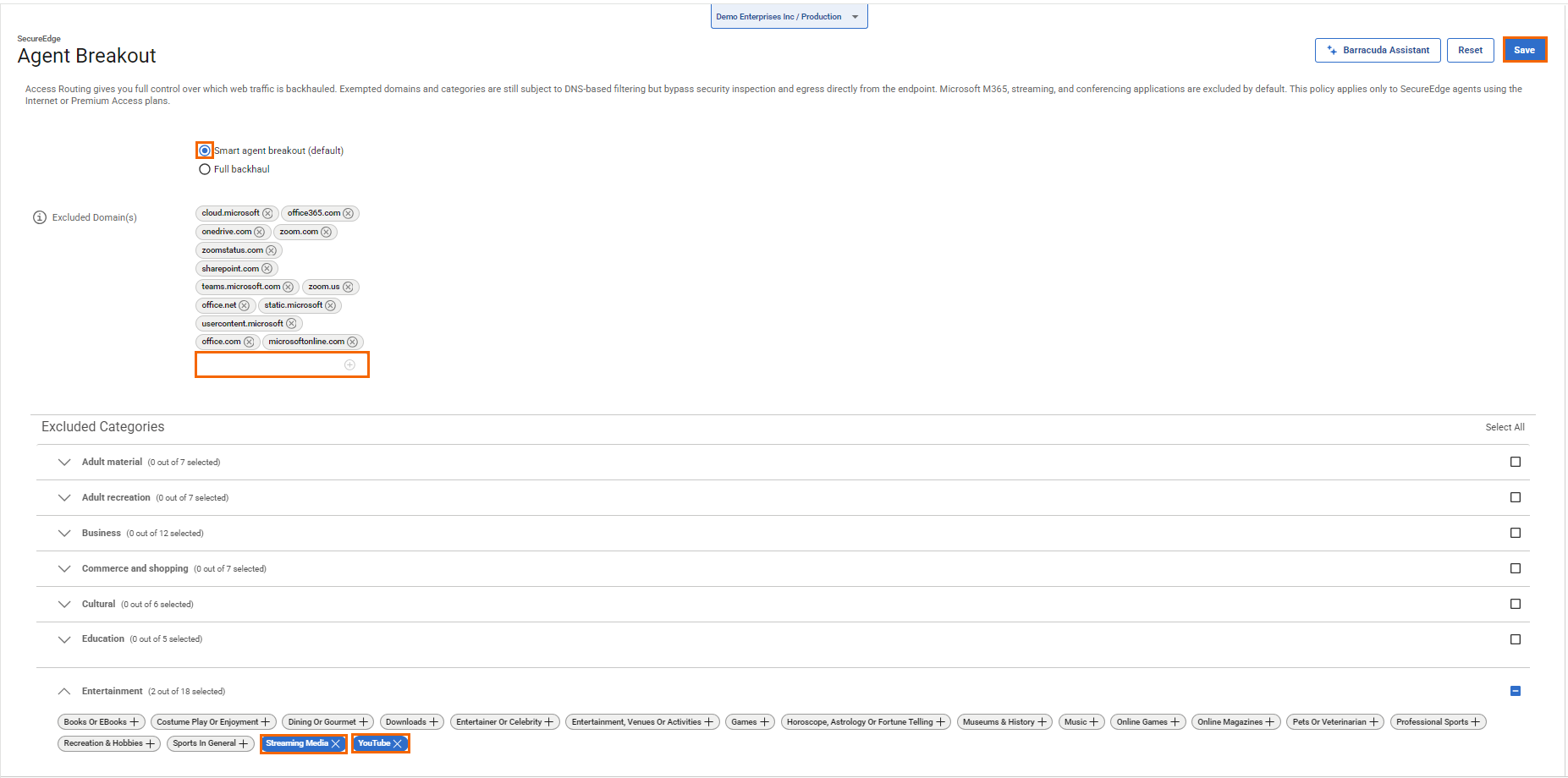
Click Save.
(Optional) Click Reset to Exclusions to restore the Agent Breakout settings to their original configuration.

After the configuration is complete, you can verify that changes to Agent Breakout in the Audit Log have been made. This feature is valid per workspace, which means all SecureEdge Access Agents in the same workspace will receive the same Agent Breakout list. When switching to Full Backhaul and then back to Agent Breakout, only the default categories are selected. You can remove all domains if at least one category is selected, and you can remove all categories if at least one domain is entered. However, you cannot remove all domains and all categories at the same time.




