It seems like your browser didn't download the required fonts. Please revise your security settings and try again.
Barracuda SecureEdge

You are currently viewing the legacy Barracuda Campus portal

Due to ongoing compatibility requirements during the migration, some users are still being redirected here. All content is being transitioned to the new Campus Training Portal and Campus Documentation Portal, and this legacy portal will be fully retired once the migration is complete.

Please visit https://campus.barracuda.com for more information.

How to Enable Support Access

  • Last updated on

Enable Support Access to allow Barracuda Networks Support technicians to access your Barracuda SecureEdge Manager and make configuration changes on your behalf. Any configuration changes done by Barracuda Networks Support are tracked in the Audit log. 

Enable Support Access

  1. Go to https://se.barracudanetworks.com and log in with your existing Barracuda Cloud Control account.

  2. In the bottom-left corner of the window, click the Profile icon.

  3. The Profile menu opens. Select Support Access.
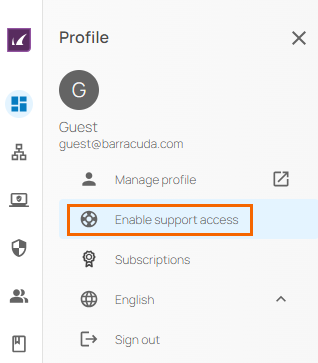
    en-support-access.png

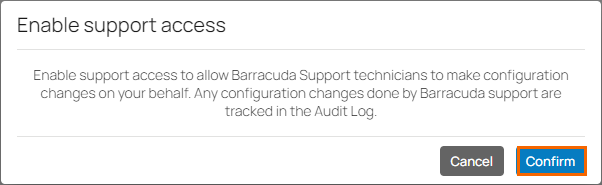
  4. Click Confirm.

    confirm-support-access.png

Note that the Barracuda Networks Support Access tunnel is open 24 hours a day.

Disable Support Access

  1. Go to https://se.barracudanetworks.com and log in with your existing Barracuda Cloud Control account.

  2. In the bottom-left corner of the window, click the Profile icon.

  3. The Profile menu opens. Select Disable Support Access.
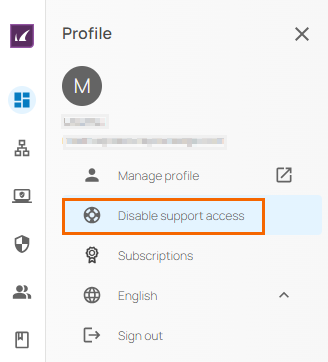
    ds-support-access.png

  4. Click Confirm again to disable Support Access.
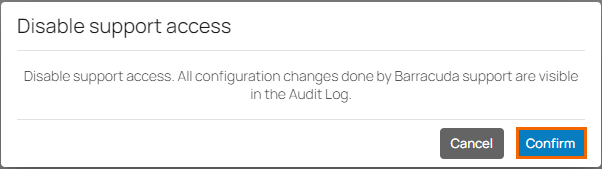
    ds-confirm.png